Wednesday, October 15, 2008

In past posts, I’ve talked a lot about Solid State Drives.  I’ve mostly discussed about why they are going to be relevant on the server side and the shortest form of the argument is based on extremely hot online transaction processing systems (OLTP).  There are potential applications as reliable boot disks in blade servers and other small data applications but I’m focused on high-scale OLTP in this discussion. OLTP applications random I/O bound workloads such as ecommerce systems, airline reservation systems, and any data intensive application that does lots of small reads and writes, usually on a database where future access patterns are unknown. When sizing a server for one of these workloads, the key dimension is the number of small random I/Os per second.  You need to add memory  to increase the memory hit rate and reduce the number I/Os or you need to add disks to support the application-required I/O rates.  The problem with adding memory is that it has linear cost – the last DIMM costs as much as the first DIMM – but only logarithmic value.  Because the workloads are random, adding memory only delivers a reduction in I/Os roughly proportional to the square root of the memory size. Cheap memory helps but, even then, the costs add up as does the power consumption as memory is added.  Alternatively, you can add disk but each disk added gives only another roughly 200 I/Os per second (IOPS) when using very expensive, 15k RPM disks.


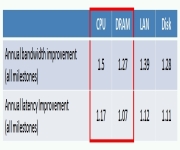
The problem is best summarized by my favorite chart these days from Dave Patterson of Berkeley:

This chart is from an amazingly useful paper, Latency Lags Bandwidth (if you know of no-charge location for this paper, let me know).  In this chart, Dave tracks the trend of bandwidth and latency over the last 20+ years. For the purposes of this discussion ignore the latency row and focus on bandwidth. Disk bandwidth is growing slower than DRAM and CPU bandwidth.  I love looking for divergent trends in that they direct us to the more fundamental problems needing innovation.


Understanding disk bandwidth growth is a growing problem, let’s compare disk sequential bandwidth with random I/O rates over-time. In the chart below, I graph sequential bandwidth growth against random bandwidth growth over the same period:


We know that disk sequential bandwidth growth lags the rest of the system. This graph shows that random IOPS bandwidth is growing even more slowly. Across the industry, we have a huge problem and the trend lines above make it crystal clear that the problem won’t be cost-effectively solved by disk alone. More detail on one dimension of the disk limits problem in: Why Disk Speeds aren’t Increasing.


Disks clearly aren’t the full solution. Ever larger memory sub-systems actually are part of the solution but the logarithmic (or worse) payback with linear cost and power consumption makes memory an expensive approach if we use it as the only tool.  Many have argued for the last couple of years that solid state disks are the solution to filling the chasm between memory and disk random IOPS rates.  Jim Gray was one of the first to make this observation in: Tape is Dead, Disk is Tape, Flash is Disk, Ram Locality is King.


The first generation, server-side SSDs were slow random write performers but we’re now seeing great components released to the market. See 100,000 IOPS and 1,000,000 IOPS. These are great performers but they are far from commodity pricing at this point.  Intel has been doing some great work on SSDs and I really like this one: Intel X25-E Extreme SATA Solid-State Drive.  It’s a step towards commodity pricing. Overall the industry now has great performing parts available and the price/performance equation is very rapidly improving since this is a semi-conductor component rather than a mechanical one.


When should we expect the crossover? At what price point are SSDs a win over HDDs?  Unfortunately, it’s an application specific answer.  It depends upon I/O density of the workload, the number of I/Os per GB of data. Bob Fitzgerald has done a great job of analyzing different workloads to understand what level of application I/O heat (IOPS per GB) are needed to justify a SSD.  Building on Fitz’s work, I have a quick test you can use to figure out how cheap an SSD will have to get before it is a win in your application.


My observation goes like this. Disks have an abundance of capacity and are short of IOPS so, on random IOPS intensive workloads, the limiting factor using HDDs will be IOPS.  SSDs have an abundance of IOPS and are short of capacity, so the limiting factor using SSDs will be capacity.  SSDs are cost effective for your application when the cost of the disk farm adequate to support the IOPS you need is more than the SSD farm required to support the capacity you need. As a formula:


current#hdd * hdd$ > CapacityNeeded / Capacity_ssd * ssd$


Let’s try an example. This example application is hosted on several hundred database servers and it’s a red hot transaction processing system.  Each system has 53 disks of which 40 are used to store data and 8 for log and a few for admin purposes.  Leave the log on magnetic media since disks sequential bandwidth is cheaper than SSD sequential bandwidth. The database size on each server is 572GB.  The disks used by this application are 15k RPM, 3 ½ disks that price out at $333 each. Understanding this, the disk budget per server for this application is 40 * 3333 which is $13,320.  We know we need 572GB and let’s assume we are trying out 64 GB SSDs.  Using that equation, 572/64 is 8.9 so we’ll need 9 SSDs to support this workload. 


Taking the disk budget of $13,320 and dividing by the 9 SSDs we have computed we need, we can afford to pay up to $1,480 for each SSD. If the SSDs cost is less than this, it’s worth doing.  This model ignores the power savings (SSDS usually run under 1/5 the power of HDDs and fewer are needed) and other factors like service costs but it’s a quick check to see if SSDs are worth considering.


We also need more data on SSD longevity in high write-rate workloads.  In the absence of historical data, ask your vendor to stand behind their product with full warrantee in your usage model before jumping in.


Speaking of wear-out rates, for the next posting I’ll investigate client-side MLC NAND-flash wear out rates.


                                                                --jrh


James Hamilton, Data Center Futures
Bldg 99/2428, One Microsoft Way, Redmond, Washington, 98052
W:+1(425)703-9972 | C:+1(206)910-4692 | H:+1(206)201-1859 |
JamesRH@microsoft.com

H:mvdirona.com | W:research.microsoft.com/~jamesrh  | blog:http://perspectives.mvdirona.com


Wednesday, October 15, 2008 6:27:15 AM (Pacific Standard Time, UTC-08:00)  #    Comments [0] - Trackback
Hardware
 Saturday, October 11, 2008

Albert Greenberg and I missed Hotnets 2008 last week due to a conflicting meeting down in California but Ken Church was there to present our On Delivering Embarrassingly Distributed Cloud Services paper.  I summarized the paper in a recent blog entry:  Embarrassingly Distributed Cloud Services and the abstract from the paper follows:


 Very large data centers are very expensive (servers, power/cooling, networking, physical plant.) Newer, geo-diverse, distributed or containerized designs offer a more economical alternative. We argue that a significant portion of cloud services are embarrassingly distributed – meaning there are high performance realizations that do not require massive internal communication among large server pools. We argue further that these embarrassingly distributed applications are a good match for realization in small distributed data center designs. We consider email delivery as an illustrative example. Geo-diversity in the design not only im-proves costs, scale and reliability, but also realizes advantages stemming from edge processing; in applications such as spam filtering, unwanted traffic can be blocked near the source to reduce transport costs.


The Hotnets agenda and all the papers present5ed are up at: Seventh ACM Workshop on Hot Topics in Networks.


The slides ken presented are posted at:

·         pptx form:  http://conferences.sigcomm.org/hotnets/2008/slides/EmbarrassinglyDistributed6.pptx

·         pdf form:  EmbarrassinglyDistributedFinalSlides.pdf (724.17 KB)


James Hamilton, Data Center Futures
Bldg 99/2428, One Microsoft Way, Redmond, Washington, 98052
W:+1(425)703-9972 | C:+1(206)910-4692 | H:+1(206)201-1859 |
JamesRH@microsoft.com

H:mvdirona.com | W:research.microsoft.com/~jamesrh  | blog:http://perspectives.mvdirona.com

Saturday, October 11, 2008 1:40:21 PM (Pacific Standard Time, UTC-08:00)  #    Comments [0] - Trackback
Services
 Saturday, October 04, 2008

Google has long enjoyed a reputation for running efficient data centers. I suspect this reputation is largely deserved but, since it has been completely shrouded in secrecy, that’s largely been a guess built upon respect for the folks working on the infrastructure team rather than anything that’s been published.  However, some of the shroud of secrecy was lifted last week and a few interesting tidbits were released in Google Commitment to Sustainable Computing.


On server design (Efficient Servers), the paper documents the use of high-efficiency power supplies and voltage regulators, and the removal of components not relevant in a service-targeted server design.  A key point is the use of efficient, variable-speed fans.  I’ve seen servers that spend as much as 60W driving the fans alone. Using high efficiency fans running at the minimum speed necessary based upon current heat load can bring big savings.  An even better approach is employed by Rackable Systems in their ICE Cube Modular Data Center design (First Containerized Data Center Announcement) where they eliminate server fans entirely.


The paper also argues for energy proportionality a concept introduced by Luiz Barroso and Urs Holzle of Google. Energy proportionality is a call to the industry to produce servers where the amount of energy consumed is proportional to the server load.  Sadly, many current server designs consume more than 60% of their full load power when idle.  None of us will talk publically about the average utilizations of our servers farms but the quick summary is that achieving very high utilizations is incredibly difficult. Or, worded differently, most servers are on average closer to idle than to full load. Even small steps towards energy proportionality make a huge difference and, of course, getting utilization up remains the holy grail of the industry.


It’s good to see water conservation brought up beside energy efficiency.  It’s the next big problem for our industry and the consumption rates are prodigious.  To achieve efficiency, most centers have cooling towers which allow them to avoid the use of energy-intensive direct-expansion chillers except under unusually hot and humid conditions. This is great news from an energy efficiency perspective, but cooling towers consume water in two significant ways. The first are evaporative losses which are hard to avoid in wet tower designs (other less water-intensive designs exist). The second is caused by the first. As water evaporates from the closed system, the concentrations of dissolved solids and other contaminants present in the supply water left behind by evaporation continue to rise. These high concentrations are dumped from the system to protect it and this dumping is referred to as blow-down water.  Between make-up and blow-down water, a medium-sized, 10MW facility, built to current industry conventions, can go through ¼ to ½ million gallons of water a day.


The paper describes a plan to address this problem in the future by moving to recycled water sources.  This is good to see but I argue the industry needs to reduce overall water consumption, whether the source is fresh or recycled.  The combination of higher data center temperatures and aggressive use of air-side economization are both good steps in that direction and industry-wide we’re all working hard on new techniques and approaches to reduce water consumption.


The section on PUE is the most interesting in that the are documenting an at-scale facility running at a PUE of 1.13 during a quarter. Generally, you want full-year numbers since these numbers are very load and weather dependent. The best annual number quoted in the paper is 1.15 which is excellent. That means that for every watt delivered to servers 0.15W is lost in power distribution and cooling. 


This number, with pure air-side cooling and good overall center design, is quite attainable.  But, elsewhere in the document, they described the use of cooling towers.  Attaining a PUE of 1.15 with a conventional water-based cooling system is considerably more difficult.  On the power distribution side, conventional designs waste about 8% to 9% of the power delivered.  A rough breakdown of where it goes is 3 transformers taking  115KV down to 13.2KV down to 480KV and then down to 208KV for delivery to the load. Good transformer designs run around 99.7% efficiency.  The uninterruptable power supply can be as poor as 94%, and roughly 1% is lost in switching and conductors. That approach gets us to 8% lost in distribution. We can easily eliminate one layer of transformers and either use a high efficiency bypass UPS.   Let’s use 97% efficiency for the UPS. Those two changes will get us 4% to 5% lost in distribution.  Let’s assume we can reliably hit 5% power distribution losses.  That leaves us with 10% for all the losses to the mechanical systems.  Powering the Computer Room Air Handlers, the water pumps etc. at only 10% overhead would be both difficult and more impressive. 


The 1.15 PUE with pure air-side economization in the right climate looks quite reasonable, but powering a conventional, high-scale, air and water, multi-conversion cooling system at this efficiency looks considerably harder to me.  Unfortunately, there is no data published in the paper on the approach and whether it was simply attained by relying on favorable weather conditions and air-side economization with the water loops idle.


The paper closes with An Efficient and Clean Energy Future, a discussion of the Renewable Energy Less Than Coal (RE<C) project.  The RE<C project isn’t part of the Google infrastructure team, and they aren’t building data centers, but it is perhaps the coolest project I’ve ever come across.  It’s just amazing. The core premise of this project is to do research into renewable energy sources that can be harnessed less expensively than coal and then let capitalism take care of the rest.  Environmental policy lags reality and is influenced by special interest groups.  If renewable energy can be made less expensive than coal, the free market system will help eliminate the burning of coal. Why fight a powerful market force if an alternative may exist. This is great research and, the more I hear about it, the more I like it.


The paper concludes that “if all data centers operated at the same efficiency as ours, the U.S. alone would save enough electricity to power every household within the city limits of Atlanta, Los Angeles, Chicago, and Washington, D.C.”. This is hard to independently verify without much more information than offered by the paper. Most of the techniques employed are not discussed in the paper published last week.  If the large service providers like Google, Microsoft, Yahoo, Beidu, Amazon and a handful of others don’t publish the details, the rest of the world’s data centers will never run as efficiently as described in the paper.  Only high-scale datacenter users can afford the R&D program to spend on increased efficiency and water consumption elimination.  I’m arguing it’s up to all of us working in the industry to publish the details to allow smaller-scale deployments to operate at similar efficiency levels.  If we don’t, it’ll continue to be the case that US data centers alone will be needlessly spending enough power to support every household in Atlanta, Los Angeles, Chicago, and Washington DC.  Each day, every day.


                                                --jrh


Thanks to Alex Mallet, Mike Neil, Janine Harrison, and many others who sent this article my way last week.


James Hamilton, Data Center Futures
Bldg 99/2428, One Microsoft Way, Redmond, Washington, 98052
W:+1(425)703-9972 | C:+1(206)910-4692 | H:+1(206)201-1859 |
JamesRH@microsoft.com

H:mvdirona.com | W:research.microsoft.com/~jamesrh  | blog:http://perspectives.mvdirona.com


Saturday, October 04, 2008 1:55:28 PM (Pacific Standard Time, UTC-08:00)  #    Comments [0] - Trackback
Services
 Sunday, September 28, 2008

An interesting file system study is at this year’s USENIX Annual Technical Conference.  The paper Measurement and Analysis of Large-Scale Network File System Workloads looks at CIFS  remote file system access patterns from two populations. The first a large file store of 19TB serving 500 software developers and the second a medium sized file store of 3TB used by 1,000 marketing, sales, and finance users.


The authors found that file access patterns have changed since previous studies and offer 10 observations:

·         Both workloads are more write-heavy than workloads studied previously

·         Read-write [rather than pure read or pure write] access patterns are much frequent compared to past studies

·         Bytes are transferred in much longer sequential runs than in previous studies [the lengths of sequential runs is increasing but note that the percentage of random access is increasing]

·         Bytes are transferred from much larger files than previous studies [files are getting bigger]

·         Files live an order of magnitude longer than in previous studies

·         Most files are not re-opened once they are closed

·         If a file is re-opened, it is temporally related to the previous close

·         A small fraction of the clients account for a large fraction of the activity

·         Files are infrequently accessed by more than one client

·         Files sharing is rarely concurrent and mostly read-only

·         Most file types do not have a single pattern of access


The comments in brackets above are mine. Some of the important points that spring out for me: the percentage of random access is increasing; for those accesses that are sequential, the runs are longer; file sizes are increasing, data is getting colder; file lifetimes are increasing; and client usage has very high skew.


Overall, file data has been getting colder and the write to read ratio has been increasing.  The authors conclude that substantial increases in the client file caches are unlikely to help significantly based upon this data. But, since file metadata requests make up roughly 50% of all operations, larger metadata caches could be very beneficial.  Log Structured File systems look increasingly like the write answer. Increasingly random access patterns make NAND flash an interesting approach. The authors didn’t directly mention it but log structured block stores (below the filesystem) is also interesting in that, like LFS, it’s a write optimized organization.  And, in addition, a log structured block store tends to sequentialize writes while randomizing reads which is ideal for NAND Flash.


Thanks to Vlad Sadovsky for sending this paper my way.


                                --jrh


James Hamilton, Data Center Futures
Bldg 99/2428, One Microsoft Way, Redmond, Washington, 98052
W:+1(425)703-9972 | C:+1(206)910-4692 | H:+1(206)201-1859 |
JamesRH@microsoft.com

H:mvdirona.com | W:research.microsoft.com/~jamesrh  | blog:http://perspectives.mvdirona.com

Sunday, September 28, 2008 7:02:02 AM (Pacific Standard Time, UTC-08:00)  #    Comments [0] - Trackback
Software
 Sunday, September 21, 2008

Ken Church, Albert Greenberg, and I just finished On Delivering Embarrassingly Distributed Cloud Services which has been accepted for presentation at ACM Hotnets 2008 in Calgary, Alberta October 6th and 7th.  This paper followed from the discussion and debate around a blog entry that Ken and I did some time back: Diseconomies of scale where we argue that the industry trend towards mega-datacenters needs to be questioned and, in many cases, is simply not cost effective.


There are times when Mega-datacenters do makes sense. Very large data analysis jobs and large, multi-server workloads with considerable inter-node communications traffice run best against large central data stores. MapReduce jobs are the classic example of this sort of workload.  However, we argue that other types of workloads actually run better in distributed micro-datacenters.  Highly partitionable applications with light inter-partition traffic can be better hosted in distributed micro-datacenters. Highly interactive applications such as Google Docs need to be close to their users.  Network round trip latencies can make highly interactive applications frustrating to use. We collectively refer to applications can be partitioned effectively and run close to the edge (the users) as Embarrassingly Distributed. Essentially, these are the easy applications when it comes to running them close to the edge.


In the paper, we argue that the class of applications that are embarrassingly distributed and therefore run well on distributed micro-datacenters is large and we are go on to show that distributed micro-datacenters can offer considerable advantage over mega-centers.  Essentially the point is that you can run many applications over distributed micr-datacenters and, if you can, you should.


Micro-datacenters are made possible by containerization that I wrote about in a 2007 Conference on Innovative Data Research Paper: Architecture for Modular Data Centers.  When that paper was published Rackable Systems had just shipped their first containerized design and Sun Microsystems had announced Black Box but it wasn’t yet shipping. Two years later, containerized designs are offered by most of the major datacenter server vendors:

·         IBM Scalable modular data center

·         Rackable ICE Cube™ Modular Data Center

·         Sun Modular Datacenter S20 (project Blackbox)

·         Dell Insight

·         Verari Forest Container Solution


Microsoft recently announced the first containerized data center in Chicago: First Containerized Data Center Announcement. The Chicago announcement is a mega-center but it does show that containerized designs are now ready for primetime.


Mega-datacenters remain useful and aren’t going away any time soon but, in Delivering Embarrassingly Distributed Cloud Services, we argue that distributed micro-datacenters are appropriate for many workloads and can reduce costs, improve the quality of service, and increase the speed of deployment.


                                    --jrh


James Hamilton, Data Center Futures
Bldg 99/2428, One Microsoft Way, Redmond, Washington, 98052
W:+1(425)703-9972 | C:+1(206)910-4692 | H:+1(206)201-1859 |
JamesRH@microsoft.com

H:mvdirona.com | W:research.microsoft.com/~jamesrh  | blog:http://perspectives.mvdirona.com


Sunday, September 21, 2008 6:22:13 AM (Pacific Standard Time, UTC-08:00)  #    Comments [2] - Trackback
Services
 Tuesday, September 16, 2008

Earlier today, I gave a talk at LADIS 2008 (Large Scale Distributed Systems & Middleware) in Yorktown Heights, New York. The program for LADIS is at: http://www.cs.cornell.edu/projects/ladis2008/program.html.  The slides presented are posted to:  http://mvdirona.com/jrh/TalksAndPapers/JamesRH_Ladis2008.pdf.


The quick summary of the talk: Hosted services will be a large part of enterprise information processing and consumer services with economies of scale of 5 to 10x over small scale deployments.  Enterprise deployments are very different from high scale services. The former is people-dominated from a cost perspective whereas people-costs are not in the top 4 major factors in the services world. 


The talk looks at limiting factors in the economic application of resources to services, one of which is power.  Looking at power in more detail, we go through where power goes in a modern data center inventorying power disapation in power distribution, cooling and server load in a high-scale data center.


Then it steps through a sampling of high scale services implementation techniques and possible optimizations including modular data centers, multi-data center failover replacing single data center redundancy, NAND flash bridging the memory to disk chasm, graceful degradation mode, admission control, power yield management, and resource consumption shaping.


                                                --jrh


James Hamilton, Data Center Futures
Bldg 99/2428, One Microsoft Way, Redmond, Washington, 98052
W:+1(425)703-9972 | C:+1(206)910-4692 | H:+1(206)201-1859 |
JamesRH@microsoft.com

H:mvdirona.com | W:research.microsoft.com/~jamesrh  | blog:http://perspectives.mvdirona.com


Tuesday, September 16, 2008 10:06:12 AM (Pacific Standard Time, UTC-08:00)  #    Comments [0] - Trackback
Services
 Thursday, September 11, 2008

This note describes a conversation I’ve had multiple times with data center owners and concludes that blade servers frequently don’t help and they sometimes hurt, easy data center power utilization improvements are available independent of the blade server premium, and enterprise data center owners have a tendency to buy gadgets from the big suppliers rather than think through overall data center design. We’ll dig into each.


In talking to data center owners, I’ve learned a lot but every once in a while I come across a point that just doesn’t make sense.  My favorite example is server density.  I’ve talked to many DC owners (and I’ll bet I’ll hear from many after this note) that have just purchased blades servers.  The direction of conversation is always the same. “We just went with blades and now have 25+kW racks”. I ask if their data center has open floor and it almost always does. We’ll come back to that.  Hmmm, I’m thinking. They now have much higher power density racks at higher purchase cost in order to get more computing per square foot but the data center already has open floor space (since almost all well designed centers are power and cooling bound rather than floor space bound).  Why?


Earlier, we observed that most well designed data centers are power and cooling bound rather than space bound.  Why is that anyway?  There is actually very little choice.  Here’s the math: Power and Cooling make up roughly 70% of the cost of the data center while the shell (the building) is just over 10%. As a designer, you need to design a data center to lasts for 15 years. Who has a clue of the needed power density (usually expressed in W/sq ft) 15 years from today? It depends upon the server technology, the storage ratio, and many other factors.  The only thing we know for sure is we don’t know and almost any choice will inevitably be wrong.  So a designer is going to have too much power and cooling or too much floor space.  One or the other will be wasted no matter what.  Wasting floor space is a 10% mistake whereas stranding power and cooling is a 70% mistake.  This 10% number applies to large scale data centers of over 10MW not in the center of New York – we’ll come back to that. Any designer that strands power and cooling by running out of floor space should have been fired years ago.  Most avoid this by providing more floor space than needed in any reasonable usage and that’s why most data centers have vast open spaces. Its insurance against the expensive mistake of stranding power.


There are rare exceptions to this rule of well designed data centers being power and cooling rather than floor space limited. But the common case is that a DC owner just paid the blade server premium to get yet again more unused data center floor space. They were power and cooling limited before and now, with the addition of higher density servers, even more so.  No gain visible yet so the conversation then swings over to efficiency. When talking about the amazing efficiency of the new racks, we usually talk about PUE.  PUE is Power Usage Effectiveness and it’s actually simpler than it sounds.  It’s the total power that comes into the data center divided by the power delivered to the critical load (the servers themselves). As an example, a PUE of 1.7 means that for every watt delivered to the load 0.7 W  is lost in power distribution and cooling.  Some data centers, especially those that have accreted over time rather than having been designed as a whole, can be as bad as 3.0 but achieving numbers this bad takes work and focus so we’ll stick with the 1.7 example as a baseline.


So, in this conversation about the efficiency of blade servers, we hear the PUE improved PUE from 1.7 to 1.4. Sounds like a fantastic deal and, if true, that kind of efficiency gain will more than pay the blade premium and is also good for society.  That would be good news all around but let’s dig deeper. I first congratulate them on the excellent PUE and ask if they had data center cooling problems when the new blade racks were first installed.  Usually they experienced exactly that and eventually bought water cooled racks from APC, Rittal, or others.  Some purchased blade racks with back-of-rack water cooling like the nicely designed IBM iDataPlex. But the story is always the same: they purchased blade servers and, at the same time, moved to water cooling at the rack. New generation servers can be more efficient than the previous generation and better cooling designs are more efficient whether or not blade servers are part of the equation. Turning the servers over onto their sides didn’t make them more efficient.


They key part of that PUE improvement above is they replaced the inefficiency of conventional data center cooling with water at the racks. Here’s an example of a medium to large scale deployment that went with blades and water cooled racks: One Datacenter to Rule Them All. There is nothing magical about water at the rack cooling designs.  Many other approach yield similar or even better efficiency. The important factor is that they used something other than the most common data center cooling system design which is amazingly inefficient as deployed in most centers. Conventional data centers typically move air from a water cooled CRAC unit through a narrow raised floor choked with cabling.  The air comes up into the cold aisle through perforated tiles.  In some aisles there are too many perforated tiles and in others too few.  Sometimes someone on the ops staff has put a perforated tile into the hot aisle to “cool things down” or to make it more habitable.  This innocent decision unfortunately reduces cooling efficiency greatly. The cool air that comes up into the cold aisle is pulled through the servers to cool them but some spills over the top of the rack and some around the ends.  Some goes through open rack positions without blanking panels. All these flows not going through the servers reduces cooling system efficiency.  After flowing through the servers, the air rises to the ceiling and returns to the CRAC. Moving air that distance with so many paths that don’t go through the servers, is inefficient.  If you move the water directly to the rack in what I call a CRAC-at-the-Rack design, the overall cooling design can be made much more efficient mostly through the avoidance of all these not-through-the-server air paths and avoiding the expense of pumping air long distances. It’s mostly not the blades that are more efficient, it’s the cooling systems redesign required as a side effect of deploying the high power density servers.


Rather than moving to blades and paying the blade premium, just changing the cooling system design to avoid the problems in the previous paragraph will yield big efficiency improvements.


Why are some data centers in expensive locations?  Sometimes for good reason in that the communications latency to low cost real estate is too high for a very small number of applications. But, for most data centers, having them in expensive locations is simply a design mistake.  Many time it’s to allow easy access to the data center but you shouldn’t need to be in data center frequently. In fact, if people are in the DC frequently, you are almost assured to have mistakes and outages.  Placing DCs in hard to get to locations substantially reduces costs and improves reliability. For those few that need to have them located in New York, Tokyo, London, etc., there aren’t very many of you and you all know who you are.  The remainder are spending too much.  Remember my first law of data centers: if you have a windows to see in, you are almost certainly paying too much for servers, network gear, etc. Keep it cheap and ugly.


What about data centers that are out of cooling capacity but can’t use all their power or floor space.  It’s bad design to strand power and simply shouldn’t happen.  We know that for every watt we bring into the building we need to get it back out again. It has got to go somewhere.  If the cooling system isn’t designed to dissipate the power being brought into the building, it’s bad design.


Now a more common cooling system problem is someone brought a 30kW rack into the data center and an otherwise fine cooling system that is appropriately sized overall, can’t manage that hot spot. This isn’t bad data center design but it does raise a question: why is a 30kW rack a good idea?  We’re now back to asking “why” on the blade server question.  Generally, unless you are getting value for extreme high power density, don’t buy it. High power density drives more expensive cooling.  Unless you are getting measurable value from the increased density, don’t pay for it. 


Summary so far: Blade servers allow for very high power density but they cost more than commodity, low power density servers. Why buy blades?  They save space and there are legitimate reasons to locate data centers where the floor space is expensive. For those, more density is good.  However, very few data center owners with expensive locations are able to credibly explain why all their servers NEED to be there.  Many data centers are in poorly chosen locations driven by excessively manual procedures and the human need to see and touch that for which you paid over 100 million dollars.  Put your servers where humans don’t want to be. Don’t worry, attrition won’t go up. Servers really don’t care about life style, how good the schools are, and related quality of life issues.


We’ve talked about increased efficiency possible with blades by bringing water cooling directly to the rack but this really has nothing to do with blades. Any DC designer can employ this technique or a myriad of other mechanical designs and substantially improve their data centers cooling efficiency.  For those choosing modular data centers like the Rackable Ice Cube, you get the efficiency of water at the rack it as a side effect of the design. See Architecture for Modula Data Centers for more on container-based approaches and First Containerized Data Center Announced for information on the Microsoft modular DC deployment in Chicago.


We’ve talked about the high heat density of blade servers and argued that increased heat density increases operational or capital cooling expense and usually both.  Generally, don’t buy increased density unless there is a tangible gain from it that actually offsets the cooling cost penalty.  Basically, do the math. And then check it. And then make sure that there isn’t some cheaper way to get the same gain.


There are many good reasons to want higher density racks.  One good one is that you are using very high speed, low latency communications between servers in the cluster – I know of examples of this from the HPC world but I’ve not found them in many commercial data centers.  Another reason to go dense is the value of floor space is high.  We’ve argued above that a very small number of centers need to be located in expensive locations due to wide-area communications delays but, again, these are rare. The vast majority of folks buying high density, blade servers aren’t able to articulate why they are buying them in a way that stands up to scrutiny.  In these usage patterns, blades are not the best price/performing solutions.  In fact, that’s why the world’s largest data center operator, Google, doesn’t use blade servers. When you are deploying 10’s of thousands of servers a month, all that matters is work done per dollar. And, at today price points, blade servers do not yet make sense for these high scale, high efficiency deployments.


I’m not saying that there aren’t good reason to buy high density server designs.  I’ve seen many. What I’m arguing is that many folks that purchase blades, don’t need them. The arguments explaining the higher value often don’t stand scrutiny. Many experience cooling problems after purchasing blade racks.  Some experience increased cooling efficiency but, upon digging more deeply, you’ll see they made cooling system design changes to increase cooling system efficiency after installation but these excellent design changes could have been deployed without paying the blade premium.  In short, many data center purchases don’t really get the “work done per dollar” scrutiny that they should get. 


Density is fine but don’t pay a premium for it unless there is a measurable gain and make sure that the gain can’t be achieved by cheaper means.


                                                --jrh


James Hamilton, Data Center Futures
Bldg 99/2428, One Microsoft Way, Redmond, Washington, 98052
W:+1(425)703-9972 | C:+1(206)910-4692 | H:+1(206)201-1859 |
JamesRH@microsoft.com

H:mvdirona.com | W:research.microsoft.com/~jamesrh  | blog:http://perspectives.mvdirona.com